
Message history
Go to Communication → Text Messages.
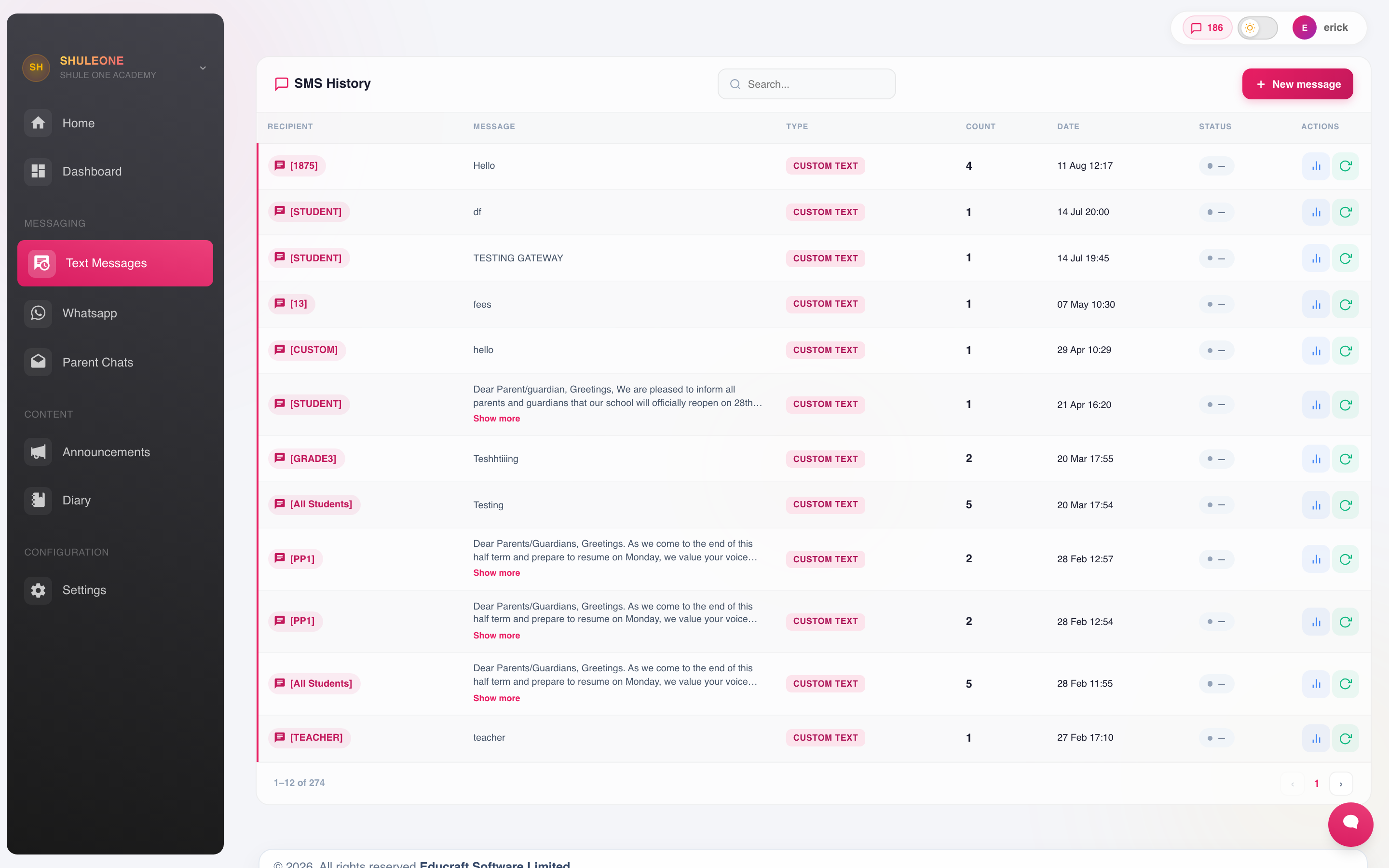
Each row records the message, audience, delivery totals and sending account.
Every message sent through ShuleOne is logged with its recipient, content, sender, timestamp and delivery status. The newest message is shown first, and every timestamp includes the year. The footer shows both the current page and the total number of pages.
One-time passwords are private security messages, so their recipients and contents do not appear in this communication history. Ordinary school messages remain available for delivery follow-up and audit.
What the log answers
Section titled “What the log answers”“I never received the message.” Search the parent’s number. The log shows whether a message was sent to it and what happened to it. Usually the answer is that the number on the student record is wrong, which you can then fix at source.
“Who sent that?” Every message records the account that sent it.
“How much did that run cost?” The log shows recipients and messaging units used. Open a message’s analytics for the delivery totals and individual recipient results.
“Did the results go out?” Filter by date and template.
Delivery status
Section titled “Delivery status”| Status | Meaning |
|---|---|
| Sent | Accepted by the network. |
| Delivered | Confirmed as reaching the handset. |
| Failed | Rejected — usually an invalid number or an unreachable handset. |
| Pending | Still in the queue. Normal for a large run for a short while. |
Sent is not delivered. A phone that is switched off shows as sent until it comes back on.
Working the failures
Section titled “Working the failures”Review failures after any significant run — results, fee statements, an urgent notice.
Failures cluster into three causes:
- Wrong number — a typo, a missing country code, a landline. Fix it on the record.
- Number no longer in service — the parent has changed it. Ask at the next contact.
- Network — transient. Resend.
Long messages can be expanded in the history table. Failed recipient rows show the reason returned by the provider and can be resent individually; use the bulk resend action when the same run has several retryable failures.
When the SMS dashboard shows a failed-message warning, select Fix now. ShuleOne filters the history to the failed batch for that date, opens its analytics and selects the failed recipient list. This identifies the affected message and numbers instead of leaving you at the general history list. Close the red date filter to return to all message history.
A parent whose messages consistently fail is effectively uncontactable by the school, which is worth knowing before the day you need to reach them urgently. Run the failure list once a term and clear it.
Retention
Section titled “Retention”The history is retained and cannot be edited or deleted from the interface. That is deliberate: it is the record of what the school told parents and when, which matters whenever a communication is disputed.
Africa’s Talking attendance messages
Section titled “Africa’s Talking attendance messages”Parent numbers saved as Kenyan local numbers or as 254… are formatted automatically
for Africa’s Talking. Parents do not need to change their saved contact numbers.
If an attendance notification failed before submission, contact support with the
attendance event and time. A failed attempt does not mean the parent received a message;
provider acceptance and confirmed delivery are separate stages.