
Voteheads and fee structures
What’s new — 14 October 2026
Section titled “What’s new — 14 October 2026”The fee-structure list now shows Assigned classes for the selected assignment year and term, including on mobile. It defaults to the current period. Choose another year or term to review older assignments, or All years / All terms to see assignments with their period labels.
A single class fee structure can now charge different voteheads or amounts to boarders and day scholars. Existing lines default to Everyone. Review each line’s category before your next billing run; existing invoices are not changed.
Assigned classes remain visible after promotion even when they have no current students. Open the original structure and select the academic year and term that were billed. The old class shows its existing assignment and invoiced amount. Uncheck that class and save to unassign and unbill its bulk charges, then assign the structure to the promoted class. Promotion does not move or remove existing invoices.
Missing brought-forward balances require a separate balance correction; unbilling and rebilling current-term charges does not restore earlier debt. The public-school July–June accounting year and the student academic year are different periods.
Voteheads
Section titled “Voteheads”A votehead is a single charge — Tuition, Boarding, Transport, Lunch, Activity, Exams, Development. Everything the school bills is a votehead, and every payment is receipted against one.
Go to Finance → Voteheads.
Select Students beside a votehead to see every learner billed under it for the selected year and term. You can filter the list by class or student status, search by admission number or name, and print or export the result.
Staff with View only or Set fee structure can inspect this list without being able to add, edit or delete voteheads. Votehead maintenance remains restricted to a finance administrator.
Select Add New.
| Field | Notes |
|---|---|
| Name | As it should appear on the invoice and receipt. |
| Account | The ledger account income posts to. |
| Type | Whether it is recurring each term or a one-off. |
| Refundable | Whether a refund can be raised against it. |
The account mapping is the part people skip and regret. It is what makes fee income appear correctly in the income and expenditure statement. A votehead with no account collects money that then has to be journalled into place by hand.
How many voteheads?
Section titled “How many voteheads?”Enough to answer the questions the school actually asks of its accounts, and no more. If the board wants to know what transport costs versus what transport collects, transport must be its own votehead. If nobody will ever ask, folding it into tuition is simpler.
Splitting a votehead later is painful — historic invoices keep the old one — so give this ten minutes of thought before the first billing run.
Fee structures
Section titled “Fee structures”A fee structure says how much a class pays under each votehead in a term. Go to Finance → Fee Structures.
The page is divided into three tabs:
- Fee structures — create structures, review voteheads and assign charges.
- Sponsored students — maintain the term-specific learners excluded from bulk billing.
- Documents — manage the printable fee documents sent through WhatsApp.
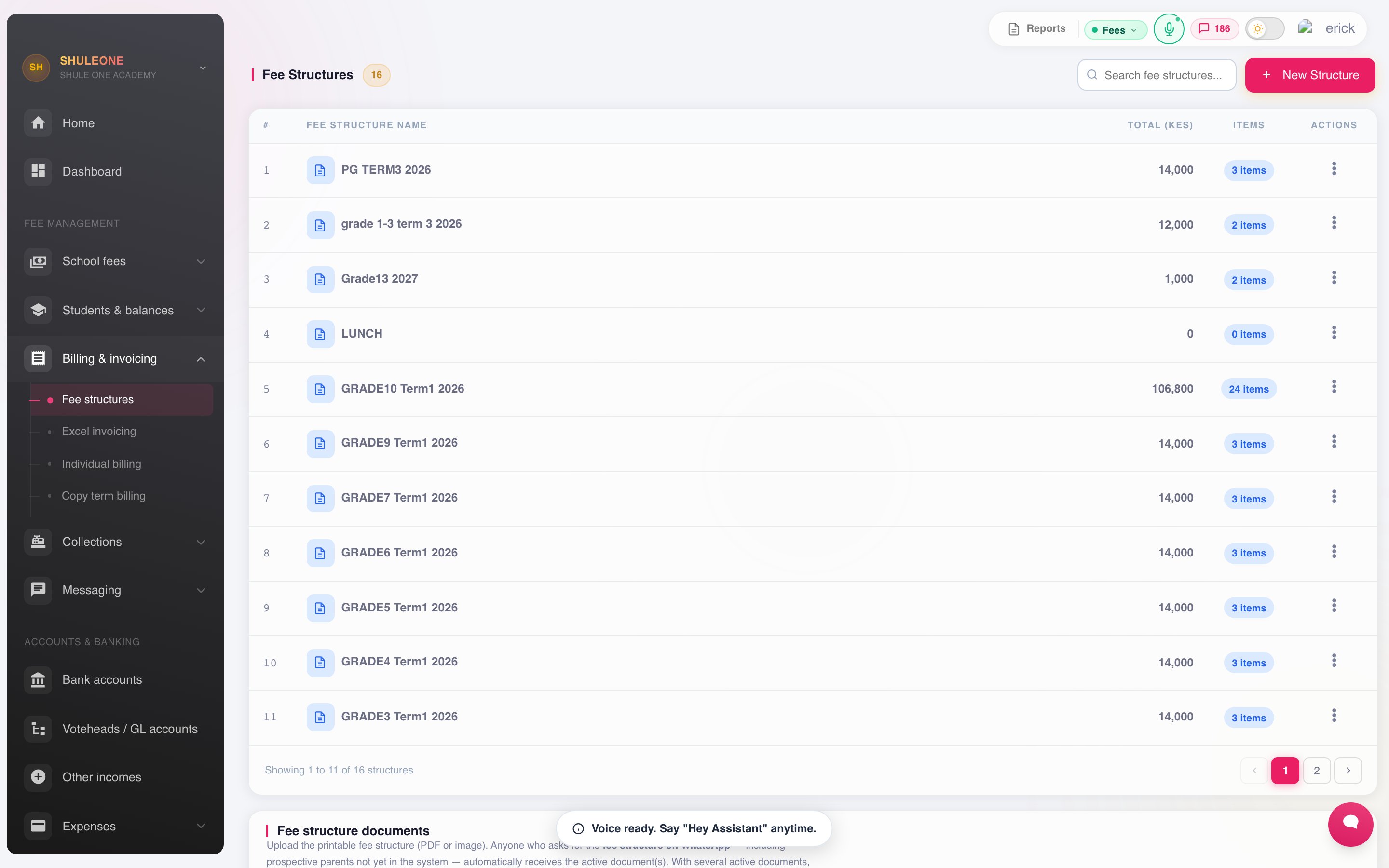
Fee structures can be filtered by class, term, curriculum and financial year.
Adding voteheads for boarders and day scholars
Section titled “Adding voteheads for boarders and day scholars”Open the structure and select Add vote head. Choose the votehead and enter its Amount (KES), then set two independent rules:
| Field | Choices |
|---|---|
| Charge these students | Everyone, Boarders only, or Day scholars only. |
| When to charge | Every eligible student or New admissions only. |
For example, put Tuition under Everyone, Boarding under Boarders only, and Day Lunch under Day scholars only. The category comes from the learner’s boarding/day-scholar status recorded in admissions; no separate billing group is needed.
If tuition amounts differ, add Tuition twice: one line for Boarders only and one for Day scholars only, each with its own amount. The system rejects overlapping categories for the same votehead, including an Everyone line alongside either category, even when their admission timing differs. Edit or remove the overlapping line first.
Read the charge summary, then select Add votehead. The modal stays open for the next entry and confirms which votehead was added. Cancel closes it without removing lines already saved. Editing an existing line closes the modal after saving.
The structure shows Boarder total and Day-scholar total separately. These totals include admission-only lines, so continuing learners may owe less. Category and timing are also visible beside each votehead.
Every eligible student lines bill current learners when the structure is assigned. New admissions only lines remain prospective during class-wide or boarder-wide assignment and are added for new admissions. Explicit By student and Bill a Group assignment include admission-only lines, but still respect boarding/day eligibility. Copying voteheads preserves both settings.
Changing a learner’s boarding/day status does not itself adjust historic invoices. Review the existing statement and use the controlled billing-adjustment workflow when charges need correction. Term Billing Copy carries forward invoice amounts rather than recalculating the structure. It skips category-specific lines whose old amount no longer matches an eligible line; assign the appropriate structure for the new term when a learner has changed category. Manual single-votehead billing remains available for intentional corrections.
Assigning a structure
Section titled “Assigning a structure”The Assigned classes column shows the saved class assignments for the Assignment year and Assignment term selected above the table. A structure with no class assignment in that scope displays Not assigned; it may still be assigned to individual learners or boarding students. Classes remain visible even when empty or inactive after promotion. Selecting All years or All terms adds the year and term to each class label. Opening Assign to classes uses the selected period, and saving an assignment refreshes the list.
Open a structure’s assignment screen, select the financial year and term, then choose one of these paths:
- By class invoices every current learner in the selected class for All students lines. New students only lines remain ready for later admissions.
- By student applies the complete structure to the learners you deliberately add, including New students only lines. Use this for newly admitted learners who were registered before the class structure was attached, or whose automatic admission billing did not run.
- Invoice all boarding students is a bulk assignment. Like class assignment, it leaves New students only lines prospective.
After saving a per-student assignment, reopen the same structure, year and term to see the assigned learners and their invoiced amounts. Removing a learner from that list and saving unassigns the structure’s individual invoice rows for that learner.
Sponsored students for a term
Section titled “Sponsored students for a term”Use the Sponsored students tab on Finance → Fee Structures when a learner’s entire class fee is paid outside the parent ledger and the learner should not receive a normal invoice. Sponsorship is recorded by financial year and term; it is not a permanent setting on the student’s profile.
- Open the Sponsored students tab and select the year and term before invoicing classes.
- Choose Manage list, search by name or admission number, and add the sponsored learners.
- Review the list and choose Save list.
- In a later term, use Copy previous term, remove learners whose sponsorship ended, and add newly sponsored learners before billing.
The saved list is excluded from By class, Invoice all boarding students, admission-triggered class billing and Term Billing Copy. By student remains an intentional override when the finance office really does need to charge a sponsored learner individually.
The system refuses to newly mark a learner as sponsored when they already have a valid fee receipt in that term. Reverse or transfer that receipt first so money is never left without the invoice it settled.
Copying a structure forward
Section titled “Copying a structure forward”Most terms are a small adjustment on the last one. Term Billing Copy copies a term’s structure into the next term, where you adjust the figures that changed rather than rebuilding the table.
Do this at the start of the term, before billing. Copying after students have been billed does not re-bill them.
Checking a structure before you bill
Section titled “Checking a structure before you bill”Read the table once, across and down:
- Across a class — does the total match what the fee circular told parents? This is the check that matters most; a structure that disagrees with the circular generates a term of complaints.
- Down a votehead — is every class that should be charged, charged?
- Boarders and day scholars — do they differ where they should, and only where they should?
What’s new
Section titled “What’s new”2 September 2026
Section titled “2 September 2026”Staff with View only or Set fee structure can now open Voteheads and inspect, print or export the students billed under a selected votehead. These permissions do not allow the staff member to add, edit or delete voteheads.
25 August 2026
Section titled “25 August 2026”Sponsored learners can now be maintained separately for each year and term. Whole-class, boarder-wide, admission and term-copy billing skip the selected learners, and the list can be copied from the preceding term and reviewed before invoicing.
The Fee Structures page now separates structure setup, sponsored learners and printable documents into dedicated tabs, making each workflow easier to find.
24 August 2026
Section titled “24 August 2026”Per-student fee-structure assignment now invoices the full structure, including lines marked New students only. The assignment screen also reloads explicitly assigned learners so their invoices can be checked or unassigned.