
Year-end close
What’s new — 19 October 2026: debt and credit before closing
Section titled “What’s new — 19 October 2026: debt and credit before closing”You do not need to close an academic fee year just to see its balance in the next year. Calculated openings include earlier valid bills, payments, refunds and credit notes, keeping both amounts owed and negative credit balances. Older automatic zero openings that hid these balances while the prior year was open have been repaired; explicit opening adjustments and verified year-end carry-forwards remain protected. See balances and reminders for examples.
Closing still verifies balances and locks the selected year. To carry the final 2026 balance into 2027, select Academic fee year and close 2026. Closing 2025 carries balances into 2026 instead.
What’s new — 14 October 2026: separate accounting and fee years
Section titled “What’s new — 14 October 2026: separate accounting and fee years”Finance → Year End Close now has a Period to manage selector:
- Financial accounting year uses the configured start month (for example, July 2025–June 2026 is 2025/2026). Close/reopen changes accounting snapshots only.
- Academic fee year uses the year recorded on student bills and receipts (for example, 2026). Close/reopen changes student fee ledgers only.
Select the matching period before closing or reopening. Reopening financial 2025/2026 does not unlock academic fee year 2026. Check the receipt’s academic year and select Academic fee year when correcting student bills or receipts.
Automatically calculated openings stay live when earlier bills or payments change. Verified carried openings and explicit opening adjustments remain protected. A reviewed repair released untouched stale 2027 carry-forwards at Lolmolok and Lorrok; stored amounts were retained for audit, and current balances use recorded transactions.
What’s new — 14 October 2026
Section titled “What’s new — 14 October 2026”Fee balances now calculate brought forward even when an academic year was not closed. Search, term and full statements, Receive Fee, and class balances use the same opening calculation. A verified or explicitly saved opening takes precedence, including a saved zero. Openings created automatically during billing or payment remain calculated. Year-end close saves a verified carried opening for the following year; an explicit opening adjustment also takes precedence over the calculated amount. If no opening exists for the selected year, ShuleOne starts from the latest earlier saved opening and includes the intervening valid bills, payments, refunds and credit notes. With no saved opening, it uses the recorded transaction history.
This calculation does not insert opening records or close a year. Continue to review and close years normally to save verified balances. If older transactions are corrected after an opening was saved, reconcile that saved opening through the authorised reopening and correction workflow; an existing opening is not silently overwritten. The student academic year is separate from a public school’s July–June accounting year.
Year-end close manages two independent periods. Accounting close snapshots the configured financial date range. Academic fee close locks student ledgers for the selected academic year and carries balances into the following academic year.
What’s new
Section titled “What’s new”4 September 2026 — Billing and receipt corrections can proceed after reopening when later student ledgers are open and their carried openings have been cleared. Keeping a later-year ledger row no longer blocks the correction by itself. Deploy and restart the backend to apply this fix, then retry the correction. Re-close the affected years from oldest to newest after completing the corrections.
2 September 2026 — Reopening now accepts following-year student openings that are already zero. ShuleOne leaves those rows untouched, reverses only balances that were carried forward by the close, and continues to block changed non-zero openings.
Go to Finance → Year End Close.
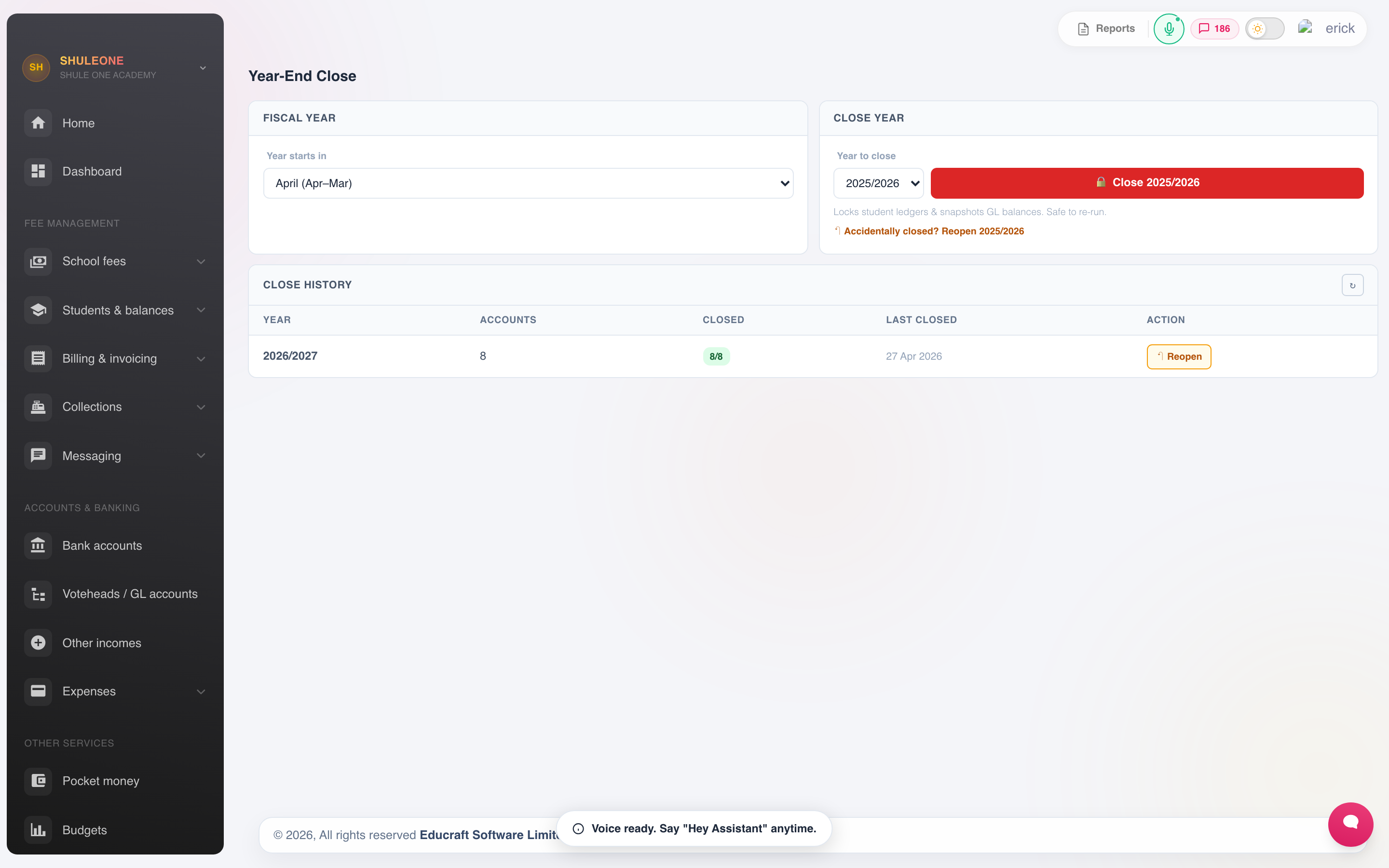
The close screen shows the current financial year, checks and opening-balance state.
Before you close
Section titled “Before you close”Reconcile every bank account to the year-end statement. An unreconciled account at close carries its discrepancy into the new year, where it is much harder to find.
Clear unreconciled payments. Money received but unmatched should be allocated or written back.
Post accruals and prepayments. Costs incurred but not invoiced, and payments made for next year, belong in the correct year. These are manual journals.
Check outstanding fee balances. Confirm the debtors figure is real: bursaries recorded, leavers transferred out, receipts entered.
Deal with credits. Overpayments and pocket money balances carry forward as liabilities. Confirm they belong to students who are still at the school.
Close procurement. Receive goods that have arrived, and match supplier bills, so purchase commitments do not straddle the year.
Run and file the reports — cashbook, income and expenditure, balances, budget against actual. File them before closing, so what you filed is what the year closed on.
Running the close
Section titled “Running the close”- Select Financial accounting year or Academic fee year, then confirm the year. For accounting, check the configured date range. For fees, use the year on the bills and receipts.
- Review the summary ShuleOne presents — the surplus or deficit being transferred, and the balances being carried forward.
- Confirm.
After closing:
- Academic fee close protects closed student ledgers from balance-changing corrections.
- Asset, liability and equity balances open the new year as opening balances.
- Income and expenditure accounts start at zero.
- The surplus or deficit is transferred to accumulated funds.
After the close
Section titled “After the close”- Open the new financial year if you have not already, and create its terms.
- Set budgets for the new year.
- Copy the fee structure forward and adjust it.
- Check the opening balances against the closing statement of the year you just closed. They should agree exactly.
If something is wrong after closing
Section titled “If something is wrong after closing”Most post-close problems should be corrected with an adjusting journal in the new year, which preserves the audit trail. If the year was closed accidentally and no later year has been closed, a finance administrator can reopen it from Finance → Year End Close:
- Select the matching Period to manage, find the closed year in its history list and select Reopen.
- Read the warning, then confirm the year.
- Correct the old-year records and close the year again immediately.
- Check that the new year’s opening balances agree with the corrected closing report.
If several years need correcting, reopen closed years from newest to oldest first. Complete all corrections, including any billing approvals, then re-close the completed years from oldest to newest. Leave the current operating year open. For example, after removing incorrect Term 3 2025 and Term 1–2 2026 bills, close 2025 again to rebuild the 2026 opening, then check the student’s 2026 statement. Keep the valid Term 3 2026 bills. See Unbilling terms a student did not attend.
Later student ledger rows remain after reopening because they may contain that year’s activity. Those rows do not block earlier corrections when they are open and their opening balances are zero or calculated live. Later closed ledgers or remaining verified non-zero openings still block the edit. If all years are open and this message remains, ask support to check the carried balances. Do not run the close again before making the correction: that restores the lock and carried opening.
Reopening is all-or-nothing. ShuleOne will not overwrite a changed non-zero opening balance or reopen a year when a later year is already closed. If it refuses the reopen, use the reason shown on screen to identify the affected balance; contact support before changing or deleting any opening-balance records.