
Balances and reminders
What’s new — 19 October 2026
Section titled “What’s new — 19 October 2026”Older automatically created zero openings have been released to the live carry-forward calculation where the preceding academic fee year is still open. Debt and overpayments now continue into the next year without requiring year-end close. A credit remains a negative balance and reduces the next year’s fees; it is never reset to zero.
For example, KES 5,600 owing plus a new KES 6,000 bill gives KES 11,600 outstanding. A KES 400 credit plus that bill gives KES 5,600 outstanding. Earlier valid payments, refunds, discounts and credit notes continue to update calculated openings. Deliberate opening adjustments, including zero and negative amounts, and verified year-end openings remain protected. The repair retains the previous stored values in an audit record and does not alter bills or receipts.
What’s new — 14 October 2026
Section titled “What’s new — 14 October 2026”Fee balances now calculate brought forward even when an academic year was not closed. Search, term and full statements, Receive Fee, and class balances use the same opening calculation. A verified or explicitly saved opening takes precedence, including a saved zero. Openings created automatically during billing or payment remain calculated. Year-end close saves a verified carried opening for the following year; an explicit opening adjustment also takes precedence over the calculated amount. If no opening exists for the selected year, ShuleOne starts from the latest earlier saved opening and includes the intervening valid bills, payments, refunds and credit notes. With no saved opening, it uses the recorded transaction history.
Reading balances does not insert opening records or close a year. When billing or receipting creates a missing yearly ledger, its opening starts with this same calculated carry-forward so the new record does not erase earlier debt. Continue to review and close years normally to save verified balances. If older transactions are corrected after an opening was saved, reconcile that saved opening through the authorised reopening and correction workflow; an existing opening is not silently overwritten. The student academic year is separate from a public school’s July–June accounting year.
Go to Finance → Fee Balances.
What’s new
Section titled “What’s new”9 October 2026 — Finance Students fits its initial page to the screen height. The Rows per page selector is above the table: choose 10, 25, 50, 100 or All to override that default, or Auto (fit screen) to restore it. The Parents list lets you choose 10, 25, 50 or 100 rows per page. Finance Students has sortable column headings and PDF/Excel exports for the whole filtered list. Generate Balances now asks for PDF or Excel and whether to keep classes separate or merge them into one list. Current-year invoicing excludes transferred and inactive learners.
5 October 2026 — Balance Notifications now has a clearly labelled Balance status selector. Choose Fully paid (NIL or overpaid) to send an appreciation message to learners with no amount owing. This includes both exact-zero and overpaid/credit accounts, while excluding debtors.
19 September 2026 — The row that used to read TOTALS at the foot of the balances table is now All Classes, and it carries the same ⋮ menu as any class row. Every action on it covers the whole school in one file: balances, invoicing, statements, billed items and the fee register. Editing or unbilling a vote head stays on the class rows, where it belongs.
8 September 2026 — Printable fee reminders now have the same payment filters as Balance Notifications. You can print for students who have paid below a chosen percentage or whose outstanding balance is at or above a chosen amount.
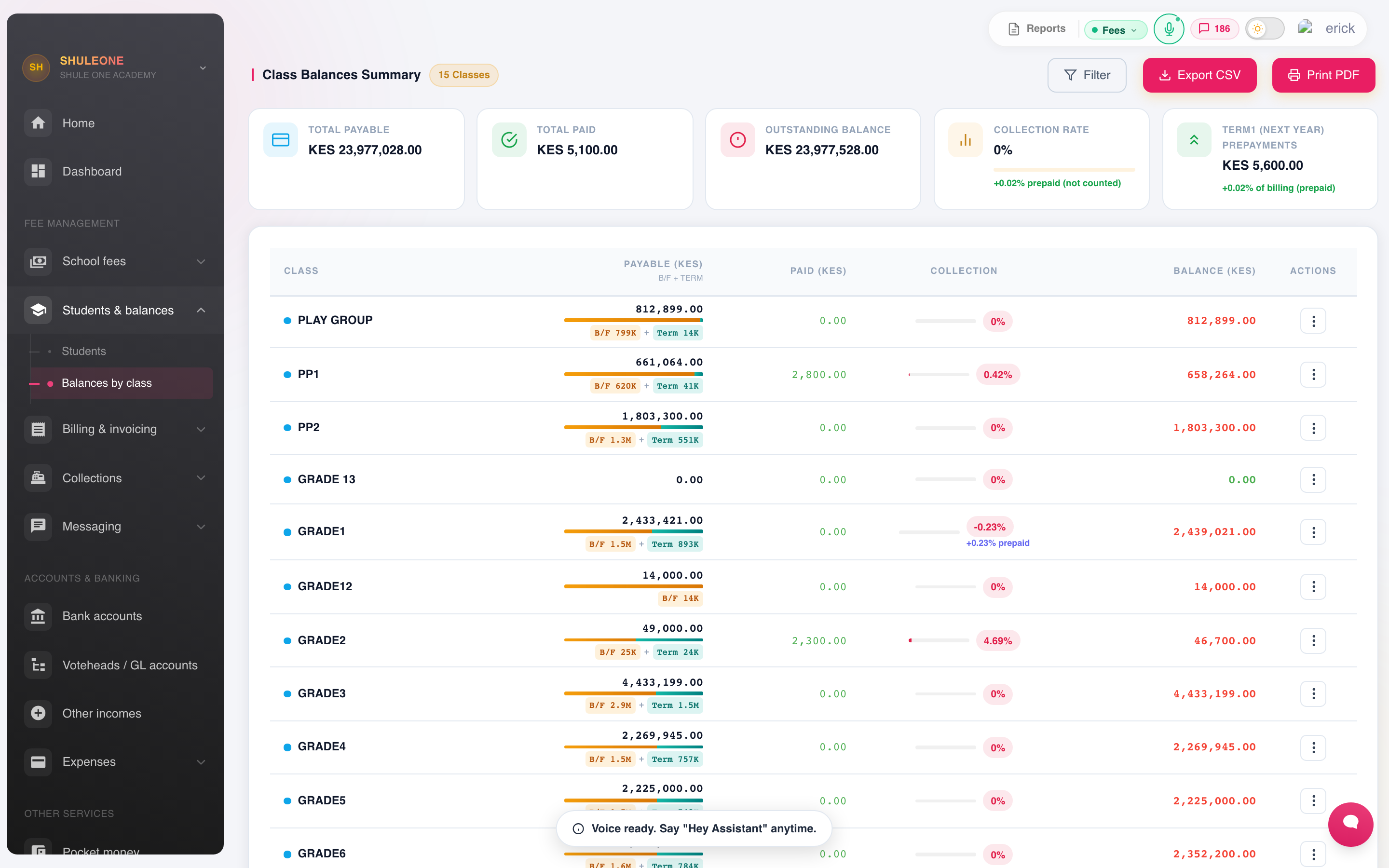
The balance screen compares invoiced, collected, outstanding and collection rates by class.
The list can be filtered by class, by size of balance, and by whether anything has been paid at all. Sorting by balance descending is the practical starting point — a handful of large debtors is usually a bigger number than the long tail.
Balances by class
Section titled “Balances by class”The class summary is what the board asks for: what is owed, by which class, and how it compares to the same point last term.
Two buttons sit above the table, and both take the year, term, cut-off date and ledger currently set under Filter:
- Export CSV — the class summary as a spreadsheet, one row per class or stream.
- Print PDF — the same class summary as a printable report with a school totals row.
Every class at once
Section titled “Every class at once”The last row of the table is All Classes. It totals the columns above it, and its ⋮ menu holds the same five actions as any class row — each one covering the whole school in a single file instead of one class at a time:
- Generate Balances — choose PDF or Excel, then Separate classes (with class headings and, for PDF, subtotals) or Merge classes into one list. It honours the student options under Filter, so the default — students who still owe — is the bursar’s arrears list for the whole school.
- View Invoicing — the vote-head breakdown per student, banded by class. Its Print PDF covers every class too.
- Generate Statements — one statement per student for the entire roll. This is the big one: a 2,800-student school produces a 2,800-page document, so expect it to take a while and think before sending it to a printer.
- View Billed Items — what each vote head has billed across the school, and how many students it reached.
- Fee Register — the running ledger book for every class, in the layout and scope you choose.
A single class still works exactly as before from its own ⋮ menu.
Finance Students
Section titled “Finance Students”Go to Finance → Students & balances → Students for the learner register. Select a column heading to sort the whole filtered register; select it again to reverse the order. The default page fits the screen height. Use Rows per page above the table to choose 10, 25, 50, 100 or All learners, and choose Auto (fit screen) to return to automatic sizing. PDF and Excel export every learner matching the current search and class filter, not only the visible page. The class balance and current-year invoicing views use the active learner roster; historical years continue to show learners billed in those years.
Sending statements
Section titled “Sending statements”Balance Notifications sends each guardian their own balance.
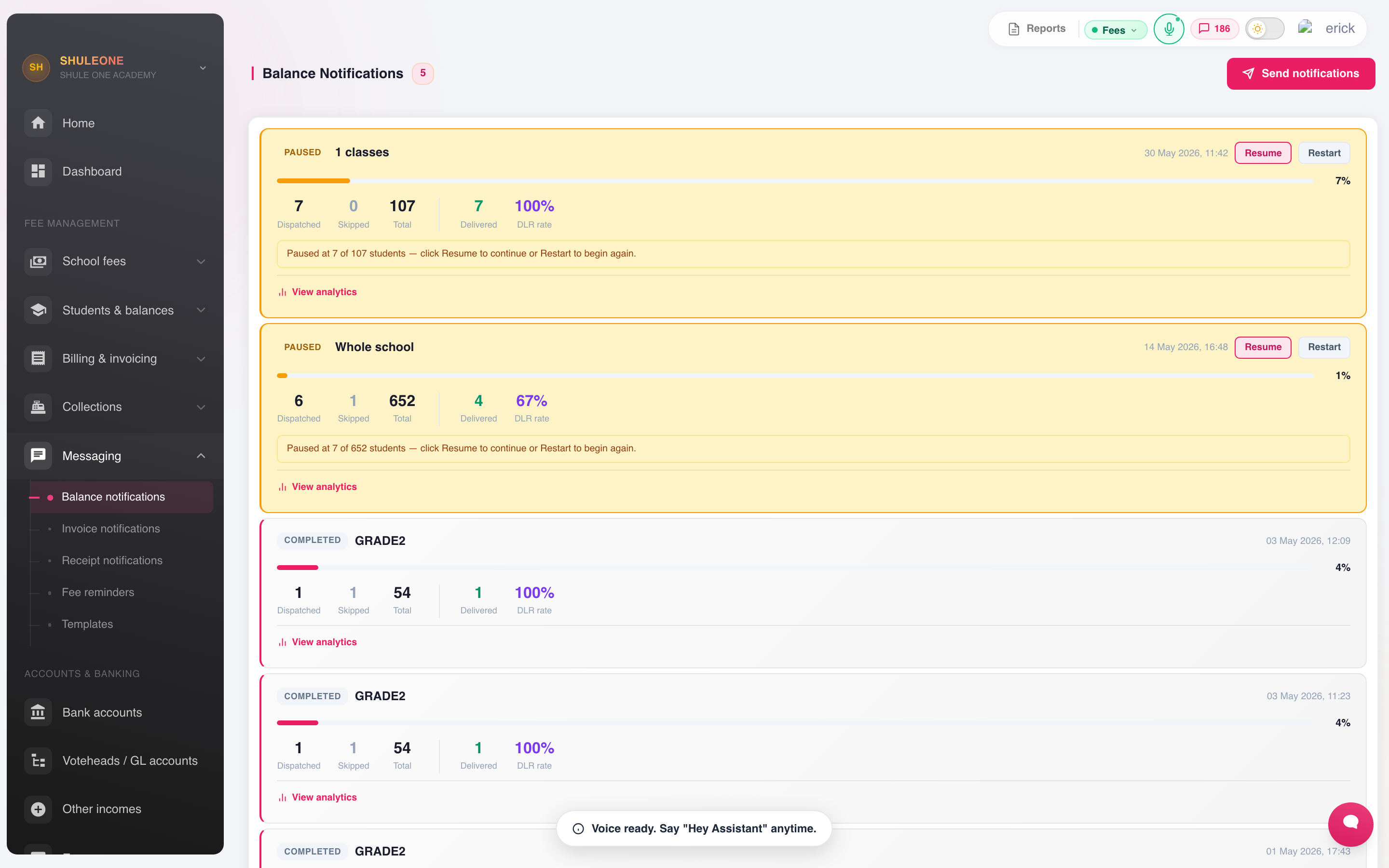
Notification batches show the audience, delivery totals and current status.
- Choose the school, class or classes to contact.
- Under Balance status, choose the audience:
- Outstanding balance — only learners who owe more than zero. This is the default for fee reminders.
- Fully paid (NIL or overpaid) — learners with no amount owing. It includes both exact-zero and overpaid/credit accounts and excludes debtors. Use this for a thank-you or appreciation campaign, and edit and preview the wording before sending.
- All students — everyone in the selected school or class scope, regardless of balance.
- If the selected term has bills under Other Levies, choose School Fees only, Other Levies only, or Combine School Fees + Other Levies. Combined messages show each balance as a subtotal and then the grand total. Schools without Other Levies billing do not see this extra choice. For an appreciation campaign, use Combine School Fees + Other Levies if both ledgers must be clear.
- Optionally narrow outstanding balances by amount or percentage paid.
- Choose the channel — SMS for a short figure, email for a full statement. Email statements are sent from ShuleOne’s no-reply address.
- Choose or edit the template — see message templates.
- Preview against one student. The preview shows the message exactly as it will arrive, with the merge fields filled. Read it.
- Send.
Pausing, resuming and starting over
Section titled “Pausing, resuming and starting over”A running SMS batch shows its progress on its card and in the top bar. The top bar only follows batches from your own school.
- Pause stops the batch after the message it is sending right now.
- Resume carries on from the next learner who has not yet been handled. Nobody already messaged is sent the reminder again.
- Start over sends the reminder again to every learner in the batch, including the ones already messaged, and uses SMS units for each of them. Use it only when the first messages were wrong.
If you press Resume or Start over straight after Pause, ShuleOne may reply that the previous run is still finishing its current message. A stalled Chacha request is now stopped by a network time limit, so wait up to about 20 seconds, refresh, and press Resume again; the batch never runs twice at the same time. If the provider does not confirm a message before that limit, the learner is counted under Failed, not Sent, and Resume continues with the next learner. Check SMS History before manually retrying a failed learner because a provider can occasionally accept a message without returning its confirmation. A batch that stops because the SMS balance ran out stays paused, so top up and then Resume.
A parent with several children at the school receives one reminder per child, each with that child’s balance.
Statements go to the guardian contacts on the student record, so their accuracy decides who actually receives one.
Receipt Notifications works the same way and sends a confirmation when a payment is received — worth turning on, as it removes a large share of “did my payment arrive” calls. Where the learner also has Other Levies billing, receipt messages and receipt PDFs automatically show the current School Fees balance, Other Levies balance, and the grand total. This applies whichever ledger received the payment.
Fee reminders
Section titled “Fee reminders”Use Finance → Fee Reminders to print one reminder slip per selected student.
- Choose the class and, if needed, one stream.
- If the selected term has bills under Other Levies, choose School Fees only, Other Levies only, or Combine School Fees + Other Levies. A combined slip shows both subtotals and the grand balance.
- Leave Only students with an outstanding balance selected unless you deliberately need slips for the whole class.
- Under Payment filter, choose one of:
- All students selected above — do not apply another payment test.
- Paid below threshold — enter a percentage from 0 to 100. A threshold of 75 includes students who have paid less than 75% of brought-forward arrears plus the current term’s billing; a student at exactly 75% is not included.
- Balance at or above threshold — enter the minimum outstanding amount. A threshold of KES 5,000 includes a student owing exactly KES 5,000.
- Select Print reminders. The PDF opens with one dated reminder slip per matching student. If no student matches, ShuleOne says so instead of printing an empty file.
The wording comes from the Fee Reminder (Print) template. Edit it under Finance → Message Templates before generating the slips. The same page can also send approved WhatsApp reminder templates to parents; preview the recipient count before sending.
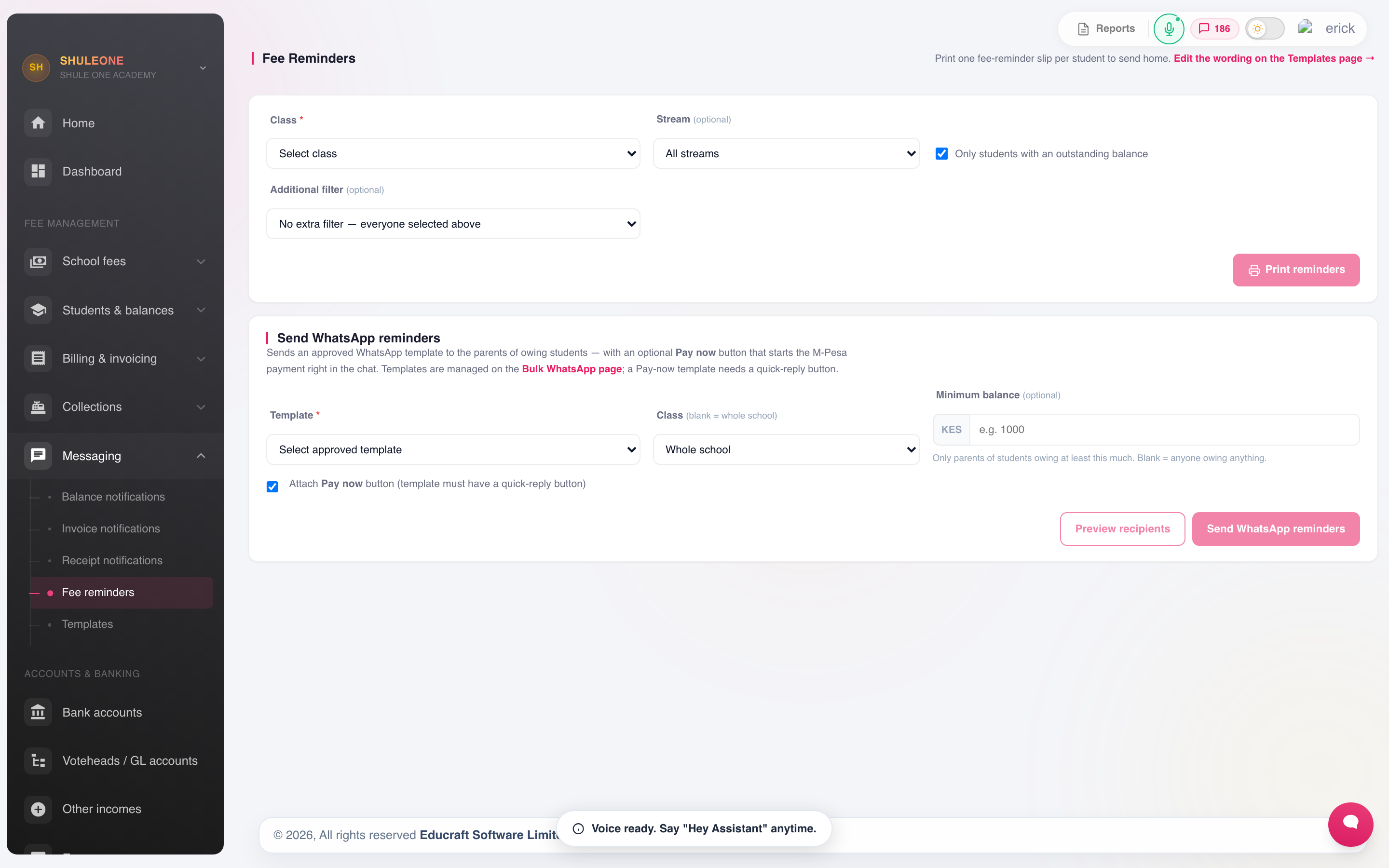
Choose the reminder audience and generate printable slips from the fee-reminder workspace.
Defaulters
Section titled “Defaulters”Filter the balances list to the students who have paid nothing, or who are above a threshold, to get the list the school actually acts on. Export it to Excel for the bursar’s call list, or to PDF for a board pack.
Before acting on the list, check it for:
- Students with an approved bursary that has not been recorded as an individual bill.
- Payments received but not yet receipted.
- Students who have left and should have been transferred out.
All three produce a debtor who does not owe anything.
Statements
Section titled “Statements”A full statement for one student — every charge, every payment, running balance — is available from their record, and is what to send when a parent disputes a figure. It shows the workings rather than a total, which usually ends the dispute without a meeting.