
Transport
If your child uses school transport, Transport shows the route and stop for the current journey and — where the school has GPS tracking fitted — where the bus is now.
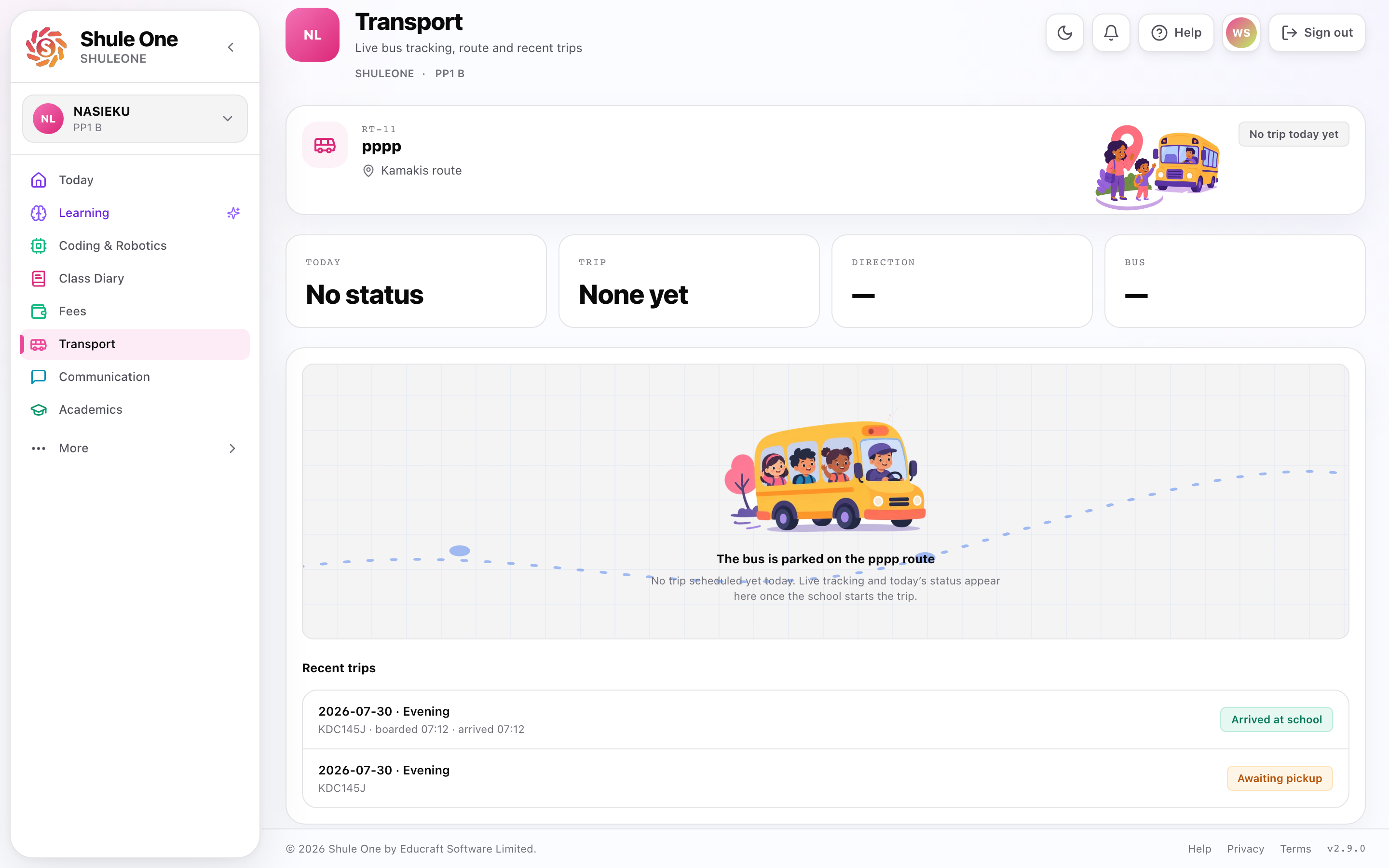
The parent transport view combines route assignment, live status and trip history.
What’s new — 30 September 2026
Section titled “What’s new — 30 September 2026”Tracking links sent by the school now open a Google map and show the road route from the bus to your child’s stop when routing is available. A few GPS readings are no longer joined with a straight line that could be mistaken for the road the bus will take. The live map inside the signed-in ShuleOne website also uses Google Maps.
On an evening journey, the app now uses only your child’s recorded drop-off point as the destination. If the crew is still calibrating that point, the map follows the live bus and says that the drop-off will be set when your child is dropped off. It does not show an ETA or route back to the school or to a morning pickup point.
What’s new — 13 September 2026
Section titled “What’s new — 13 September 2026”The live map now follows each new bus location automatically. Touch, drag or zoom the map when you want to inspect somewhere else; this pauses follow mode so the camera does not fight you. Choose Follow bus to centre the latest position and resume automatic following. The control reads Following bus while follow mode is active.
Opening Full screen also resumes follow mode automatically, so the larger map stays centred on the moving bus. You can still move the full-screen map to pause following.
What’s new — 8 September 2026 (prepared for testing)
Section titled “What’s new — 8 September 2026 (prepared for testing)”Transport messages now name the child and use shorter wording. Tap a phone notification to see that selected message at the top of the inbox, then choose View child transport. When the school has recorded the child on the message, the app selects that child. Other notifications remain listed newest first. The website bell also expands the selected message, with Open update to continue.
If the school arranges a relief pickup, your regular route can remain the same while today’s bus changes. Tracking follows your child’s current trip. Call Driver and Call Conductor use the crew recorded for that trip when phone numbers are available.
If the Android map stays blank, it switches to the alternative map automatically after about 12 seconds without loaded map tiles. You can switch sooner with Map blank? Use alternative map. If the alternative map cannot load its tiles, use Retry map after checking the connection. Its dashed line is an approximate connection between the bus and the displayed destination, not a driving route.
Boarding and alighting are separate confirmations. A bus arrival alert reports where the vehicle is; the child’s arrival or drop-off message requires a scan or crew confirmation.
Easier map controls — prepared for testing
Section titled “Easier map controls — prepared for testing”Choose Follow bus after moving or zooming the map to return to the bus’s latest available position and resume automatic following. The button is disabled while no bus position is available. Choose Full screen for a larger map with the same live status and controls. Use Exit full screen to return; on the website you can also press Escape, and on Android you can use Back. The mobile full-screen map supports portrait and landscape. The alternative map is available there too if the native map is blank.
The live map
Section titled “The live map”Open Transport in ShuleOne to follow the bus directly on the live map. It shows the vehicle’s current position, updated as it moves.
It answers the question the school office is otherwise phoned about forty times on a wet morning: where is the bus?
Use it to time leaving the house rather than standing at the stop for twenty minutes. It is at its most useful on the days the bus is delayed.
The first evening calibration journey may not show a destination or ETA while your child is still on the bus. This is intentional: the crew records the real drop-off when the child gets off. Later evening journeys can then route to that calibrated point. The bus position continues updating during calibration.
What it does not tell you
Section titled “What it does not tell you”The map shows where the vehicle is, not whether your child is on it. A bus at the school does not confirm your child boarded.
If your child did not travel, tell the school — otherwise they may be marked absent, or someone may be waiting for them.
Pickup arrangements
Section titled “Pickup arrangements”Your child’s morning and evening journeys are recorded separately. They may use different routes, stops, crews or default buses. The location used by the school to calculate the transport fee is stored separately and does not force both journeys onto that route.
For each school day, the parent view follows the actual bus recorded on the trip. If the school replaces the run’s normal bus for that day, tracking follows the replacement; the normal service-run assignment does not need to be rewritten.
Check it at the start of term. Routes change, and a child assigned to last year’s route is a problem best found before the first morning.
To change a pickup or drop-off arrangement, contact the school. Ask them to confirm whether the change is permanent, only for one school day, or only affects billing; these are separate records and cannot be changed from the parent view.
Delays and messages
Section titled “Delays and messages”The school can send a message to the parents on one route — a breakdown, a delay, a diversion. These arrive by SMS or as a notice, and the map will show the reason.
If the bus is very late and you have heard nothing, ring the office rather than the driver. The driver is driving.
Half term and closing day
Section titled “Half term and closing day”Closing days are the hardest transport days of the term: everyone leaves at once, and arrangements change.
Confirm in advance how your child is travelling, tell the school if it differs from normal, and check the diary for the departure time. A change told to the school the morning of closing day may not reach the right person in time.
Safety
Section titled “Safety”Transport records exist so the school knows which child is on which vehicle. Keeping your child’s record accurate is part of that — an out-of-date pickup point or an old phone number matters most on the day something goes wrong.
If you change your phone number, tell the office. It is the number they will ring.
Testing a local review build
Section titled “Testing a local review build”If your school has provided the ShuleOne Local Test app for a review session, use the test account and trips in the school’s local test database. The regular ShuleOne app uses the online service and will not show those local trips. The laptop backend and phone connection must stay active. Local tests show inbox updates but do not send SMS, WhatsApp or phone push notifications.
If an early test build still shows online routes or no local trip, install the latest local test APK, reopen Transport and pull down to refresh. The updated build includes a fresh connection configuration. You may need to sign in with your local test account again. Select a child assigned to the local trip.