
Fees and payments
Finance shows what is owed, what has been paid, and what is due next.
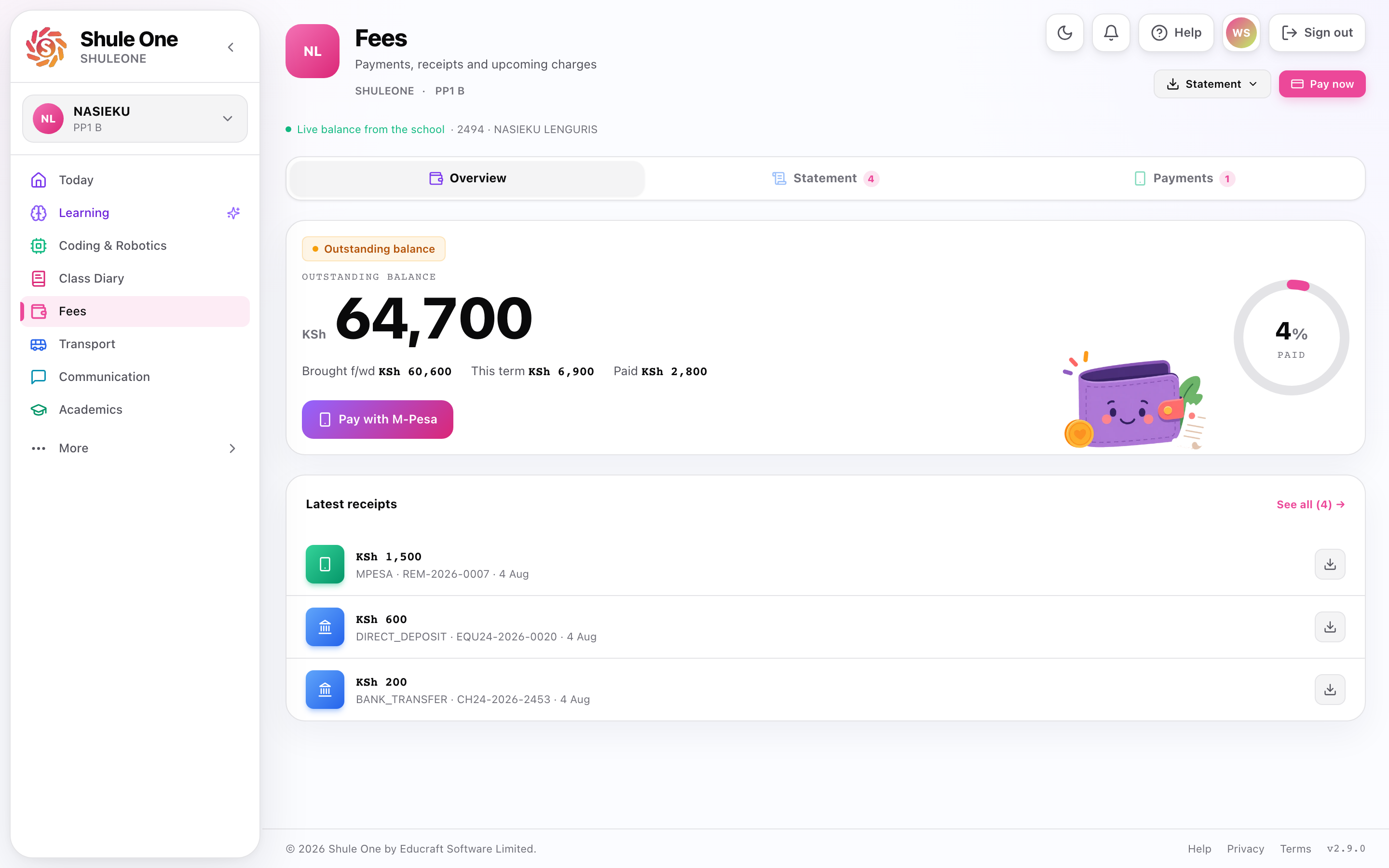
The parent finance view shows the current balance, payment options and recent receipts.
What’s new — 8 October 2026
Section titled “What’s new — 8 October 2026”Schools connected through OLLIN/Spotcash can now offer the same Pay now M-Pesa prompt as direct M-Pesa and Family Bank accounts. The payment form shows the receiving school account; confirm OLLIN SACCO · Paybill 480587 when it is offered, then approve the prompt on your phone. ShuleOne links the payment to the selected learner automatically.
The Pay now sheet is now shorter and keeps the important choices together. Choose Full, Half, or Other; the amount box appears only when you choose Other. M-Pesa payments must be at least KSh 10. The receiving account and phone number appear below the amount, and the send button stays at the bottom of the sheet while you review the details.
Confirmed Family loans repayments now have their own receipt page. Open a loan, tap a payment under Payments, and review its amount, date, M-Pesa reference, learner, and school. Select View PDF receipt to read the receipt in the app, or Save PDF to keep a copy. These loan receipts are separate from school fee receipts.
What’s new — 7 October 2026
Section titled “What’s new — 7 October 2026”At schools with M-Pesa prompts, Pay now in ShuleOne Connect can use the school’s Family Bank paybill. Choose the receiving bank when more than one is available, review the amount and phone number, then approve the prompt on your phone. A bank confirmation may arrive before the fee receipt; check Fees before sending another payment. Schools without prompts still show their written payment instructions.
Family loans now uses a visible learner list for both one-child and multi-child requests. Tap a learner to see their current assessment, then add them to the request. The next page shows the amount for each learner and the repayment schedule. The final page shows the estimated repayments and terms before you apply.
When repaying, you can change the amount and the M-Pesa number that receives this payment’s prompt. The payment popup shows each stage, and the loan page shows the latest attempt while confirmation is pending or needs review.
Your balance
Section titled “Your balance”The figure at the top is the current balance for the selected child. Check the child switcher if you have more than one.
Below it, the statement lists every invoice raised and every payment received, in date order, with the running balance. This is the same statement the school’s finance office sees.
Reading a statement
Section titled “Reading a statement”Fees are billed in voteheads — tuition, boarding, transport, lunch, activity, and so on. Your statement shows each separately rather than as one lump, so you can see what you are paying for.
A credit is money paid that has not been applied to an invoice — usually an overpayment or a payment made before the term’s invoices were raised. It stays on the account and is used against the next invoice.
Paying
Section titled “Paying”In ShuleOne Connect, open Fees → Pay now for the selected child. If your school supports payment prompts, choose Full, Half, or Other. Choosing Other opens the amount box; enter at least KSh 10. Select the bank account when the school offers more than one, confirm the M-Pesa phone number, then approve the prompt on that phone. The app uses the child’s admission number as the payment reference; provider channels may add the school’s institution code automatically. If the balance is already clear, you can still enter an amount to pay ahead for a future term.
If the app says confirmation is taking longer, check Fees and your M-Pesa message before trying again. A confirmed bank payment can take a short time to appear as a school receipt. If your school has not enabled prompts, Pay now shows the school’s written payment instructions when available.
M-Pesa — enter the amount and your phone number and confirm the STK push on your phone. The payment is matched to your child’s account automatically and the balance updates within a minute or two.
Card — pay by card through the school’s payment provider.
Bank — if your school uses bank collections, the account details are on your statement. Always use your child’s admission number as the reference. A payment with no reference has to be traced by hand and can take days to appear.
After you pay
Section titled “After you pay”You should receive a confirmation and see the payment on your statement.
If a payment does not appear:
- Wait a few minutes. Reconciliation is quick but not instant.
- Check the M-Pesa message on your phone — it confirms the money left.
- Contact the school office with the transaction code. They can trace it.
Do not pay again because the first payment has not shown up. Nearly every duplicate payment starts this way, and getting one refunded takes far longer than waiting.
Receipts and documents
Section titled “Receipts and documents”Every payment produces a receipt, available under Documents to view or download.
Keep them. They are the evidence if a payment is ever disputed.
Fee reminders
Section titled “Fee reminders”The school may send balance reminders by SMS or WhatsApp. These come from the same figures you see here.
If a reminder does not match your view, the usual explanation is timing — the reminder was generated before your last payment was reconciled. Check your statement, and if it still disagrees, ring the office.
If you cannot pay
Section titled “If you cannot pay”Talk to the school early. Most schools will discuss a payment plan, and the conversation is much easier before arrears build up than after.
Requesting fee financing
Section titled “Requesting fee financing”In ShuleOne Connect, open Fees → Family loans. The first page shows any active loan, its remaining balance and next payment. If you have several children, each loan is labelled with the child’s name and school; select a loan to see its instalments, payments and receipts. New request opens the financing form. The app only offers children whose schools take part in fee financing. A funded loan with an outstanding balance is labelled Active loan for that learner. Open it to see the balance and repayment plan.
If an instalment is late beyond its stated grace period, the contracted late charge appears separately in the loan balance. A repayment clears outstanding late charges first, then the scheduled loan amount. Any fractional Kenya-shilling amount is shown as a rounding credit so the M-Pesa amount stays in whole shillings.
Repaying a family loan
Section titled “Repaying a family loan”Open a loan and select Repay with M-Pesa. The amount starts at the full amount currently payable. You can edit it to make a smaller payment in whole Kenya shillings. The form shows your saved M-Pesa number when it is valid. You can enter a different Kenyan M-Pesa number for this payment without changing the number on your account. Check both fields before selecting Send prompt, then confirm with your M-Pesa PIN on your phone, never in ShuleOne.
The popup tracks Sending M-Pesa prompt, Payment processing, and Receipt confirmed. A confirmed payment shows its receipt and takes you back to the loan page with the updated balance. An invalid number or amount stays on the form for correction. If the prompt fails or its result is uncertain, the popup and loan page show the latest status. Check that status and your M-Pesa message before trying again so that you do not make a duplicate payment. Payments toward one child’s loan do not alter another child’s loan.
Under Payments on that loan page, tap a confirmed repayment to see its receipt details. You can open the PDF in ShuleOne Connect and save a copy from the receipt page. The receipt confirms that repayment only; it is not a receipt for a school fee payment.
Your credit reports
Section titled “Your credit reports”Select Credit reports on the Family loans page to open My credit reports. There is a separate assessment for each linked child at a participating school. Choose View report to read it or Download to save the PDF. Reports show the assessment and available amount as of the time they were generated; an assessment or projection does not guarantee approval.
Schools taking part in fee financing show Fee financing in Fees in the parent web portal and Family loans in ShuleOne Connect. ShuleOne lists linked learners whose schools are enabled, even when a learner has no amount available today. Each learner card shows the verified fee balance and the amount currently available toward that balance. Learners from schools that have not joined fee financing do not appear in this selector.
Select New request to see participating learners in one list. Tap any learner to open their current assessment in a sheet from the bottom. The sheet shows the score, minimum score, available amount and practical ways to strengthen the next assessment. It also lets you add an eligible learner to the request, remove a selected learner, open an active loan, or download the full credit report. A learner with no available amount remains visible for assessment but cannot be added to a new request. Following an assessment suggestion does not guarantee approval.
ShuleOne selects the best compatible financing arrangement in the background; parents do not choose a lender or product. Select Download full credit report for the complete assessment as a PDF, including when no amount is currently available. The report includes the score and qualifying minimum, KPI performance charts, the weighted score calculation, limit drivers, repayment-period projections and prioritised suggestions for strengthening the verified record. It also explains how the score and available limit are calculated. The projections and suggestions do not guarantee approval or a future limit.
To apply for one or several eligible learners:
- Add each learner from their assessment sheet. The list shows who is selected.
- Continue to Amount and repayment. Enter the amount for each learner and choose one repayment period; a multi-learner request uses the same period for every learner.
- Select Review request to see each amount, the estimated repayments and the combined total. Open and accept Review & terms, then apply.
Every allocation must be positive and stay within that learner’s verified fee balance and available limit. ShuleOne rechecks all learners when you submit. The multi-learner submission is atomic: if any allocation is no longer valid, none of the applications is saved and the app keeps the entered amounts for correction. Each learner’s allocation is assessed and tracked as its own fee-financing application, even though the parent submits the group together.
Open Application history on the Family loans page to see every previous request, its learner, amount, submission date and latest status. A declined request can also show the decision note supplied for that application. Requests that still need a bank statement keep the upload action in this history.
The terms popup shows the combined request, each learner’s allocation, estimated repayments, late-payment terms and how the data is used. Accepting it allows ShuleOne to share only the verified fee, payment and assessment data needed for those applications with the financing services ShuleOne assigns. Not every request is approved. The financing service—not the school—makes the credit decision, and no fee receipt appears until the school actually receives and records funds.
If the lender requests a bank statement
Section titled “If the lender requests a bank statement”An existing request may show Bank statement requested. This does not give the lender automatic access to a bank account or document. Select Review consent & upload, read the separate disclosure, then choose an unprotected PDF, CSV or text statement no larger than 5 MB. Nothing is shared if you cancel.
ShuleOne extracts cash-flow totals and patterns, shares the analysis with the financing service assigned to that request, records a fingerprint for audit and discards the raw file. Extraction can be incomplete, so low-confidence results are marked for manual review and the lender must verify the original with you. A statement analysis must not be the lender’s only reason for a credit decision.
On WhatsApp, send loan 15000 3 agree for KES 15,000 over three months, or
loan 15000 now agree for one payment. agree is the explicit data-sharing
permission; without it, ShuleOne shows the disclosure and saves nothing.
If your school is not enrolled, the portal and mobile app hide fee-financing options. WhatsApp says the school is not enrolled when someone sends a loan command directly. No request is saved in that case; contact the school directly to discuss other payment arrangements.