
Quests and stages
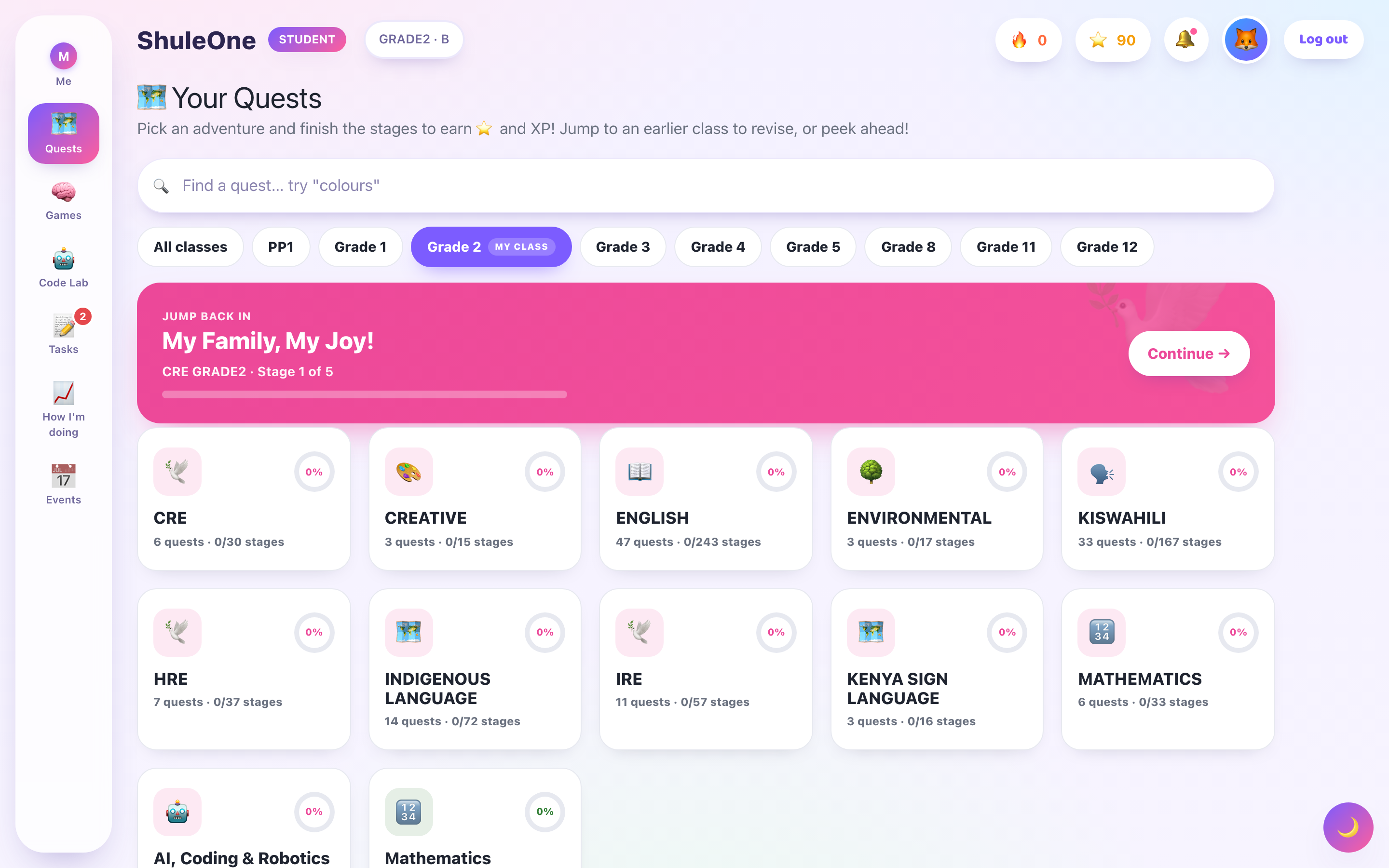
A quest is a map of an area of learning. Instead of a list of topics, you see a route with stops along it, and you can see where you are on it.
The map
Section titled “The map”The quest map shows the stages along the route, joined in order. Each stage looks different depending on where you are:
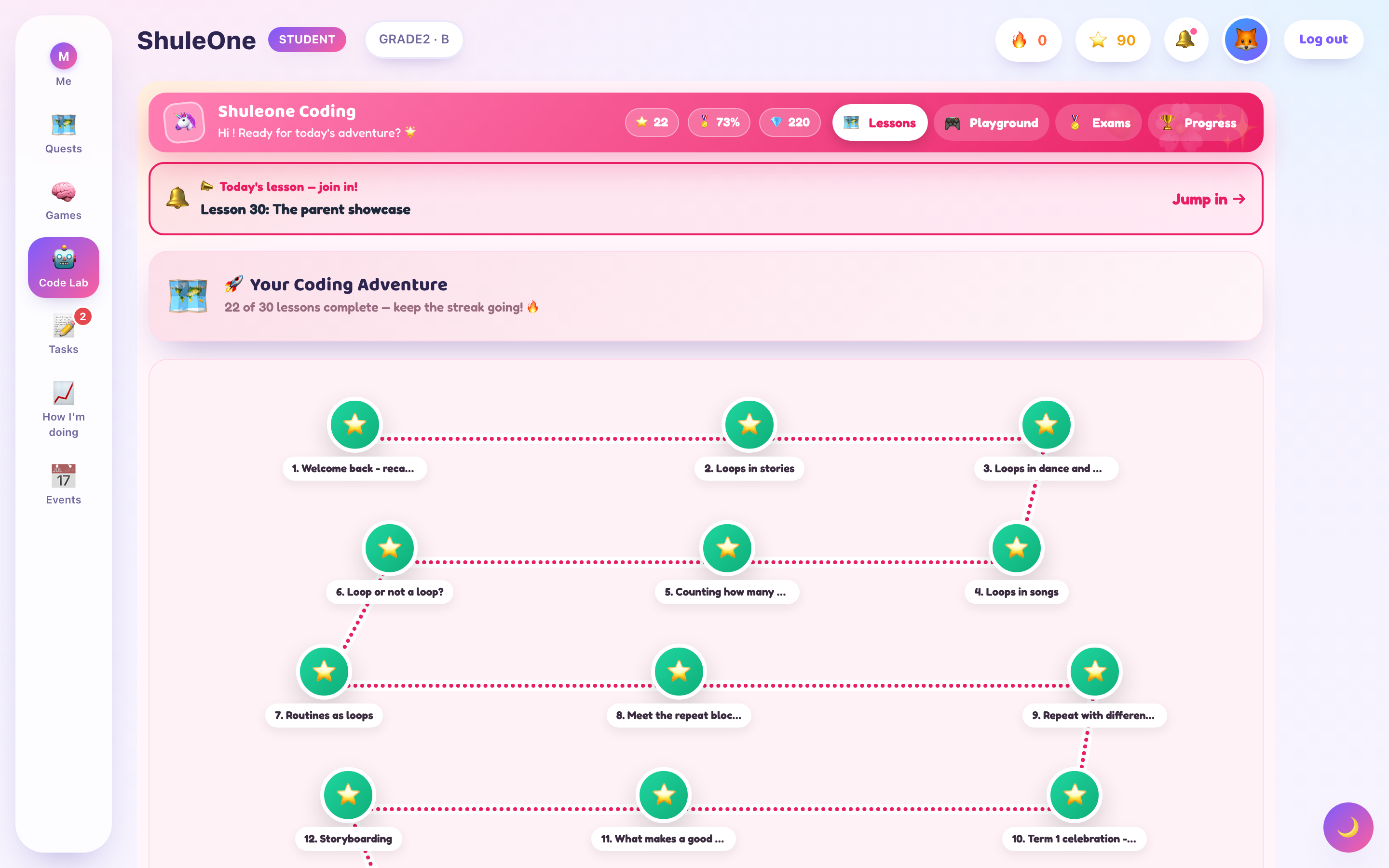
- Complete — you have finished it. You can go back to it any time.
- Open — the one you are on, or the next one available.
- Locked — not yet. It unlocks when you finish the stages before it.
Selecting an open stage starts its lesson. Selecting a completed one lets you go through it again, which is the right thing to do before an exam.
Why stages lock
Section titled “Why stages lock”Stages unlock in order because the material is built that way — a later stage assumes you did the earlier one. Locking is not a restriction so much as a reading order.
If a stage will not unlock, you have almost certainly left an activity unfinished in the stage before it. Open that stage and look for the activity that is not ticked.
Finding your quests
Section titled “Finding your quests”Quests shows the quests available to you. Which ones you have depends on your class and what your school has set up. Some are set by your teacher; others you can pick up on your own.
Quests are grouped by subject, so you can look at everything in Mathematics rather than scrolling through everything at once.
Working through one
Section titled “Working through one”Do them in order. The route exists for a reason.
Do not rush to unlock. Finishing activities quickly to open the next stage gets you a map full of ticks and not much else. The ticks are not the point.
Go back. Completed stages stay open. Redoing one you found hard, a week later, is the single most useful thing you can do with the portal.
Watch the map, not the lesson. When you are choosing what to do next, the map shows you where the effort is going.
Recommended stages
Section titled “Recommended stages”The portal suggests stages based on how you did on earlier ones. A stage recommended after you got several questions wrong is revision — the same material approached again. It is not the portal telling you that you failed; it is the part of the system that actually helps.
Projects and submissions
Section titled “Projects and submissions”Some stages are projects rather than lessons — a piece of work you make and hand in rather than questions you answer. These go to your teacher for marking, and come back with a comment.
Submitting is explicit. A project you have built but not submitted has not reached your teacher, however finished it looks on your screen.
When something looks wrong
Section titled “When something looks wrong”| What you see | What it usually is |
|---|---|
| No quests at all | Your class has not been given any. Ask your teacher. |
| A stage that will not unlock | An unfinished activity in the stage before it. |
| A quest that disappeared | The term changed, or your class was moved to a different one. |
| Progress that did not save | You lost connection mid-activity. Redo that activity — the rest is kept. |
Topic leagues on your learning home
Section titled “Topic leagues on your learning home”Your learning home can place you in a topic league when your recent work shows a skill that needs practice. You can join more than one topic. These leagues currently use the structured CBE/CBC Grade 4–12 pathway.
Open a league in Your next learning steps to see your target, review date, quest, tutor and fresh check. Aim for three short practice sessions before the seven-day review. After reaching 70%, return for the later memory check. Passing that check completes your round and keeps your history. If you need more practice, another round is created. After three rounds, ask your teacher or a trusted adult for help with the difficult step.
A round without a fresh check pauses after 21 days. Complete a check to restart. Completed rounds stay in My earlier rounds when you return to the topic later. The dates are checkpoints, not a promise of a particular examination grade.
View progress board compares score improvement with learners in the same topic, grade and starting week. Complete at least two checks to appear. Other learners are shown anonymously. School learners compete within their school; independent learners have a separate group. This is separate from the all-time lesson XP leaderboard.
What’s new — 14 September 2026
Section titled “What’s new — 14 September 2026”Topic leagues now offer automatic practice rounds, fresh checks, retained progress history and a topic-specific progress board.
Topic leagues and lower classes
Section titled “Topic leagues and lower classes”Open Your next learning steps to see curriculum-matched plans and My topic leagues. School learners in Playgroup, PP1, PP2 and Grades 1–3 are included, with separate class identities and the same round history used by upper classes.
Preschool learners practise the suggested topic with a teacher or parent. When the school enables assessments, Open school assessments leads to assigned work. A newly marked topic assessment can update league progress. Grades 1–3 also retain the text tutor; generated tutor checks are available under the existing Grade 4+ rules. A quest button appears only when a matching published quest exists.
What’s new — 14 September 2026
Section titled “What’s new — 14 September 2026”Lower-class school learners can now see their recommended plans and leagues. Teacher/parent-guided practice and marked school topic checks support their progress while more learning materials are being prepared.
School curriculum recommendations
Section titled “School curriculum recommendations”Your school class and linked subjects determine your recommended topics. For a supported active syllabus, your next learning steps appear automatically on Home, including a home that also shows school materials. Complete a starting check when there is not enough evidence yet; a topic league appears when results show a gap.
Use the activities shown for your topic. A tutor or quest button appears only when that activity is supported. For England mathematics, read the topic objectives, practise with your teacher and use Open school assessments when your school has enabled assessments. A marked topic check updates progress; simply opening an activity does not count as improvement. Reviews and league history work the same way as other school classes.